
How To Place Collect In-store Order
Select Your Product(s)
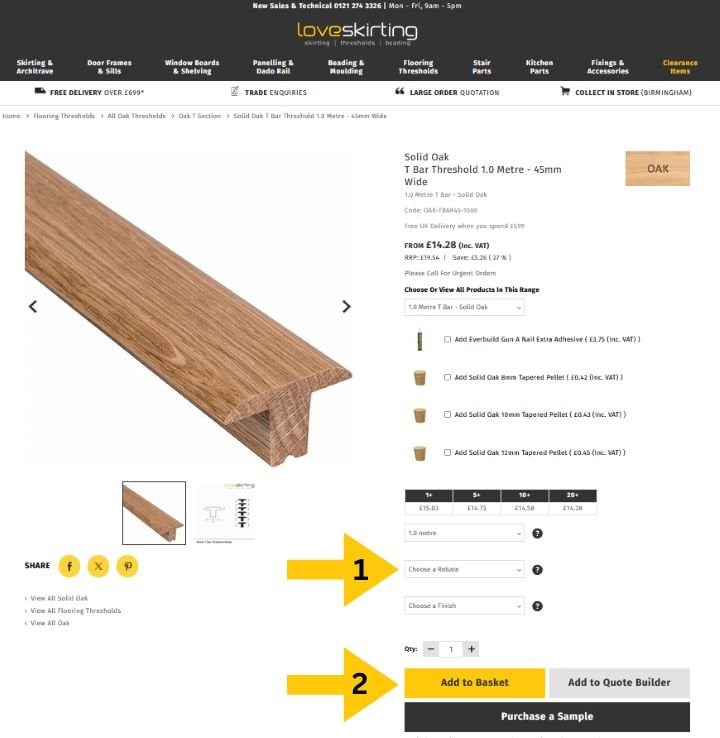
Select your product(s) and all required dropdown options on the product display page.
Also add the quantity you would like to order.
Once you have selected everything you need to, you can now select "Add to basket"
Select Basket
Now that you are ready to start reviewing and submitting your order, please select the icon "Basket" in the top right hand corner of our website (see illustration)

View Basket
This next screen will summarize all the products you have added to your basket.
At this stage you can choose to proceed or you can revisit our extensive catalogue to add more items.
At this stage you will also need to select which payment option you would like to use such as a card payment (Mastercard, Maestro & Visa) Paypal or BAC's.

Register/Login with Details
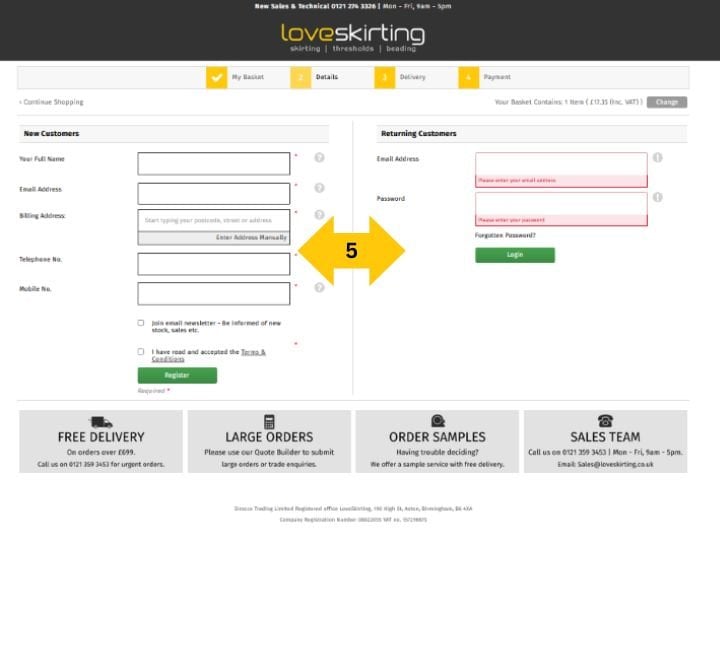
You can now enter your delivery information for us to send the products straight to your location if your a new customer.
For existing customers, you can also log into your account from this screen and proceed to the payment screen.
Select Collect In Store Option
Once you've entered your delivery information you can now select the option of our "Collect in-store" service option.

Choose Payment Method & Confirm Order
Select the required method of payment and submit the order.

Order Confirmation
You order will then be created & confirmed. This will also contain your order reference number beginning with "LS" should you wish to contact us regarding your order.
Thank you for shopping with Loveskirting.
